LiteLLM Proxy Integration
Langfuse provides observability for LiteLLM: every LLM call routed through the LiteLLM Proxy can be logged to Langfuse, with token usage, cost, and latency captured per request. In this guide, we will show you how to set it up.
What is LiteLLM? LiteLLM is an open-source LLM gateway: a proxy and SDK that provides a single unified API to call and manage hundreds of different LLM providers and models with OpenAI-compatible endpoints.
What is Langfuse? Langfuse is an open-source LLM observability platform that helps you trace, monitor, and debug your LLM applications.
There are three ways to integrate LiteLLM with Langfuse:
- Sending logs via the LiteLLM Proxy to capture all LLM calls going through the proxy.
- Using the LiteLLM SDK to capture LLM calls directly.
- Using a compatible client SDK (such as the Langfuse OpenAI SDK wrapper) to capture LLM calls in your application code — see below.
This integration is for the LiteLLM Proxy. If you are looking for the LiteLLM SDK integration, see the LiteLLM SDK Integration page.
LiteLLM Proxy
Add the integration to your proxy configuration:
1. Add the credentials to your environment variables
export LANGFUSE_PUBLIC_KEY="pk-lf-..."
export LANGFUSE_SECRET_KEY="sk-lf-..."
export LANGFUSE_OTEL_HOST="https://us.cloud.langfuse.com"  # Default US region
# Other Langfuse data regions: https://cloud.langfuse.com (EU), https://jp.cloud.langfuse.com (Japan), https://hipaa.cloud.langfuse.com (HIPAA)
# export LANGFUSE_OTEL_HOST="https://otel.my-langfuse.company.com"  # custom OTEL endpoint
2. Setup litellm_config.yaml
model_list:
  - model_name: gpt-5.1
    litellm_params:
      model: gpt-5.1
litellm_settings:
  callbacks: ["langfuse_otel"]
3. Start the proxy
litellm --config /path/to/litellm_config.yaml4. Use the proxy to log traces to Langfuse
curl -X POST "http://0.0.0.0:4000/v1/chat/completions" \
  -H "Content-Type: application/json" \
  -H "Authorization: Bearer sk-xxxx" \
  -d '{
    "model": "gpt-3.5-turbo",
    "messages": [
      {"role": "system", "content": "You are a very accurate calculator. You output only the result of the calculation."},
      {"role": "user", "content": "1 + 1 = "}
    ]
  }'
5. See the LiteLLM generations in Langfuse
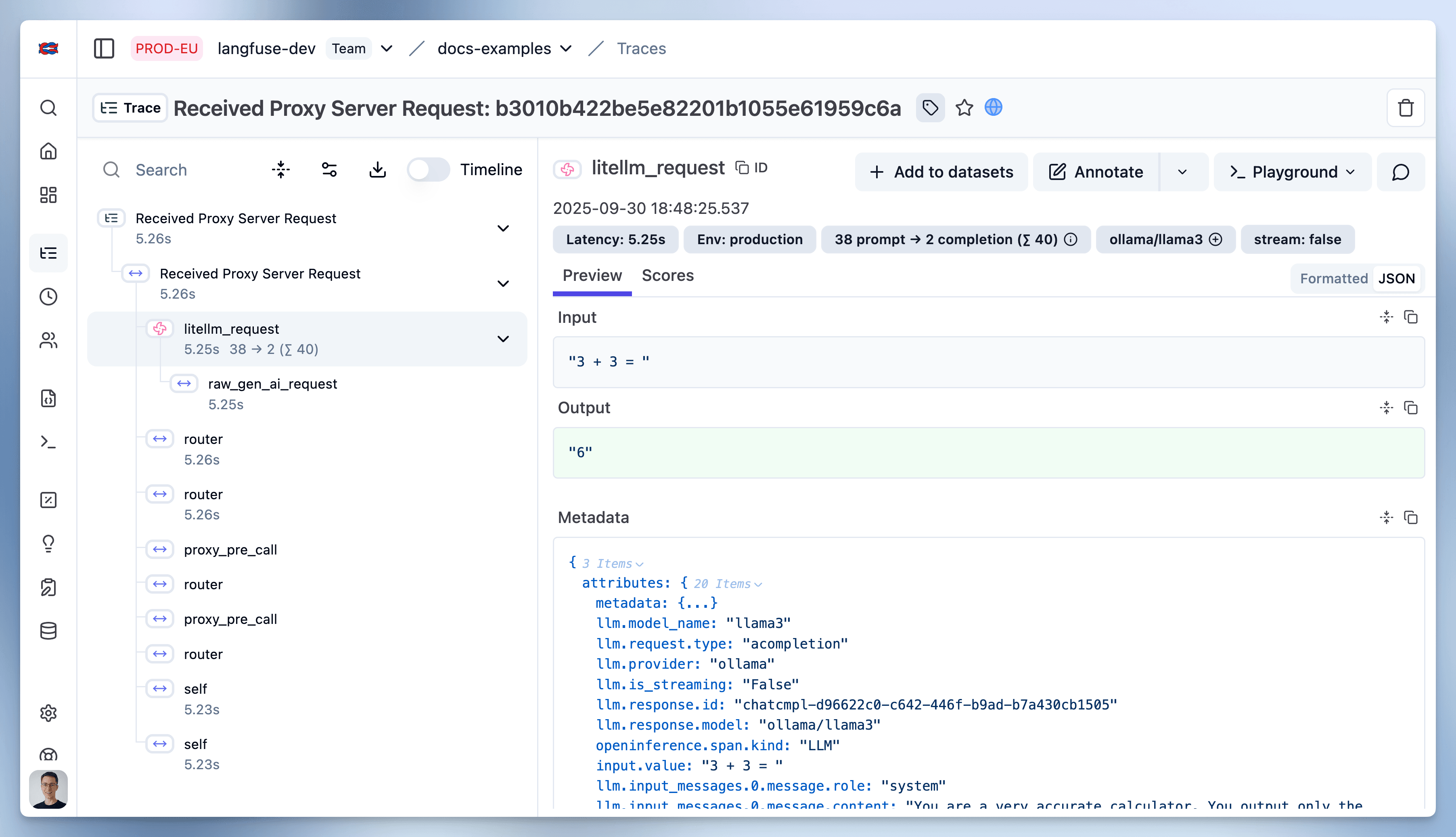
You can find detailed information on how to use the LiteLLM Proxy in the LiteLLM docs.
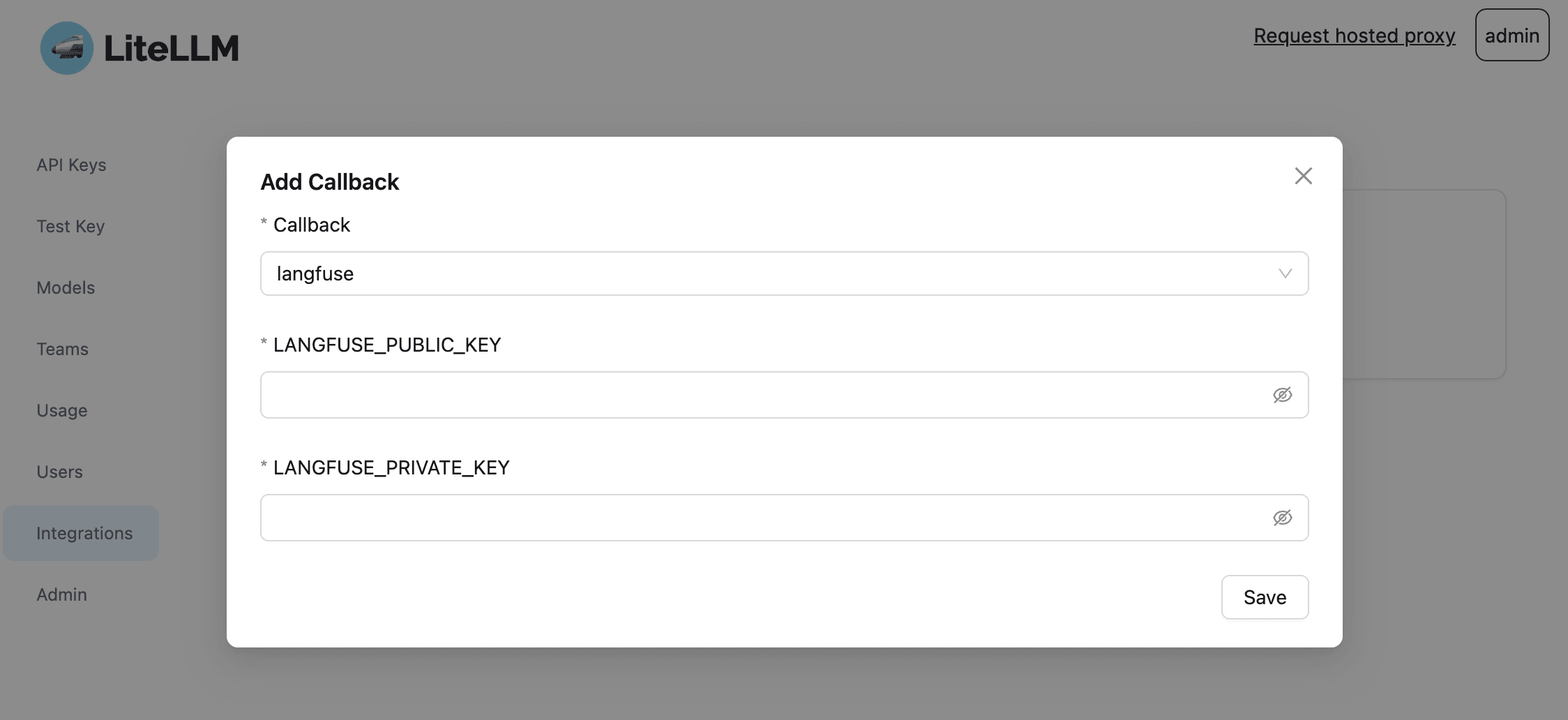
By setting the callback to Langfuse in the LiteLLM UI you can instantly log your responses across all providers. For more information on how to set up the Proxy UI, see the LiteLLM docs.
You can add additional Langfuse attributes to the requests in order to group requests into traces, add userIds, tags, sessionIds, and more. These attributes are shared across LiteLLM Proxy and SDK, please refer to both documentation pages to learn about all potential options:
Trace calls client-side with the OpenAI SDK wrapper
Instead of (or in addition to) logging from the proxy, you can trace calls in your application code with the Langfuse OpenAI SDK wrapper (Python, JS/TS). Since the proxy exposes an OpenAI-compatible API, the wrapper captures every call routed through it as a generation in Langfuse, and you can group multiple calls into a single trace.
Install the dependencies and set your Langfuse credentials:
pip install langfuse openaiimport os
# Get keys for your project from the project settings page: https://cloud.langfuse.com
os.environ["LANGFUSE_PUBLIC_KEY"] = "pk-lf-..."
os.environ["LANGFUSE_SECRET_KEY"] = "sk-lf-..."
os.environ["LANGFUSE_BASE_URL"] = "https://cloud.langfuse.com" # 🇪🇺 EU region
# Other Langfuse data regions include 🇺🇸 US: https://us.cloud.langfuse.com, 🇯🇵 Japan: https://jp.cloud.langfuse.com and ⚕️ HIPAA: https://hipaa.cloud.langfuse.comPoint the wrapped OpenAI client at the proxy to log a single call:
from langfuse.openai import openai

# LiteLLM Proxy runs on http://0.0.0.0:4000 by default
client = openai.OpenAI(base_url="http://0.0.0.0:4000")

completion = client.chat.completions.create(
    model="gpt-5.1",
    name="calculator",  # optional name of the generation in Langfuse
    messages=[
        {"role": "system", "content": "You are a very accurate calculator."},
        {"role": "user", "content": "1 + 1 = "},
    ],
)
print(completion.choices[0].message.content)
Use the @observe() decorator to group multiple proxy calls into a single trace, for example when your application mixes LLM calls with retrieval or API calls:
from langfuse import observe
from langfuse.openai import openai

client = openai.OpenAI(base_url="http://0.0.0.0:4000")

@observe()
def calculate():
    results = []
    for task in ["1 + 1 = ", "2 + 3 = "]:
        completion = client.chat.completions.create(
            model="gpt-5.1",
            messages=[
                {"role": "system", "content": "You are a very accurate calculator."},
                {"role": "user", "content": task},
            ],
        )
        results.append(completion.choices[0].message.content)
    return results

calculate()
Install the dependencies and set your Langfuse credentials:
npm install openai @langfuse/openai @langfuse/tracing @langfuse/otel @opentelemetry/sdk-nodeLANGFUSE_SECRET_KEY = "sk-lf-..."
LANGFUSE_PUBLIC_KEY = "pk-lf-..."
LANGFUSE_BASE_URL = "https://cloud.langfuse.com" # 🇪🇺 EU region
# Other Langfuse data regions include 🇺🇸 US: https://us.cloud.langfuse.com, 🇯🇵 Japan: https://jp.cloud.langfuse.com and ⚕️ HIPAA: https://hipaa.cloud.langfuse.comInitialize the OpenTelemetry SDK with the Langfuse span processor:
import { NodeSDK } from "@opentelemetry/sdk-node";
import { LangfuseSpanProcessor } from "@langfuse/otel";

const sdk = new NodeSDK({
  spanProcessors: [new LangfuseSpanProcessor()],
});

sdk.start();
Wrap the OpenAI client with observeOpenAI and point it at the proxy to log a single call:
import { OpenAI } from "openai";
import { observeOpenAI } from "@langfuse/openai";

// LiteLLM Proxy runs on http://0.0.0.0:4000 by default
const client = observeOpenAI(new OpenAI({ baseURL: "http://0.0.0.0:4000" }));

const completion = await client.chat.completions.create({
  model: "gpt-5.1",
  messages: [
    { role: "system", content: "You are a very accurate calculator." },
    { role: "user", content: "1 + 1 = " },
  ],
});
console.log(completion.choices[0].message.content);
Use startActiveObservation to group multiple proxy calls into a single trace:
import { OpenAI } from "openai";
import { observeOpenAI } from "@langfuse/openai";
import { startActiveObservation } from "@langfuse/tracing";

const client = observeOpenAI(new OpenAI({ baseURL: "http://0.0.0.0:4000" }));

await startActiveObservation("user-request", async () => {
  for (const task of ["1 + 1 = ", "2 + 3 = "]) {
    await client.chat.completions.create({
      model: "gpt-5.1",
      messages: [
        { role: "system", content: "You are a very accurate calculator." },
        { role: "user", content: task },
      ],
    });
  }
});
Learn more about LiteLLM
What is LiteLLM?
LiteLLM is an open source proxy server to manage auth, loadbalancing, and spend tracking across more than 100 LLMs. LiteLLM has grown to be a popular utility for developers working with LLMs and is universally thought to be a useful abstraction.
Is LiteLLM an Open Source project?
Yes, LiteLLM is open source. The majority of its code is permissively MIT-licensed. You can find the open source LiteLLM repository on GitHub.
Can I use LiteLLM with Ollama and local models?
Yes, you can use LiteLLM with Ollama and other local models. LiteLLM supports all models from Ollama, and it provides a Docker image for an OpenAI API-compatible server for local LLMs like llama2, mistral, and codellama.
How does LiteLLM simplify API calls across multiple LLM providers?
LiteLLM provides a unified interface for calling models such as OpenAI, Anthropic, Cohere, Ollama and others. This means you can call any supported model using a consistent method, such as completion(model, messages), and expect a uniform response format. The library does away with the need for if/else statements or provider-specific code, making it easier to manage and debug LLM interactions in your application.
GitHub Discussions
Last edited


